Running Screaming Frog on GCP with Cloud Run Jobs
Every guide I’ve seen about running Screaming Frog in the cloud has you spin up a VM that sits there running 24/7 - even when you’re not crawling. That means paying for idle time around the clock, and I don’t want that. Cloud Run Jobs on GCP flips this: spin up a container, run the crawl, container shuts down - all automatically. You only pay for the minutes the crawl actually runs.
At Precis, I built an internal service that runs Screaming Frog crawls at scale using Cloud Run Jobs. This post walks through the core setup - a simplified version you can deploy in about 30 minutes.
For this proof-of-concept, we’re going to use Cloud Run Jobs, Cloud Storage, and a simple Dockerfile combined with a bash file used as its entrypoint.
Why Cloud Run Jobs
Assuming 4 CPU / 16GB - a size I’ve found works well for a wide variety of crawls (more on that later) - here’s how Cloud Run Jobs compares to an always-on VM of the same size:
| Usage | Cloud Run Jobs | Always-on VM |
|---|
| 30 min/week | ~$1/mo | ~$97/mo |
| 30 min/day | ~$7/mo | ~$97/mo |
| 2 hrs/day | ~$29/mo | ~$97/mo |
You’d need over 6 hours of daily crawl time before Cloud Run Jobs even matches the cost of a single VM.
It also scales horizontally. Need to crawl 10 sites at the same time? Just fire off 10 jobs - each gets its own container with dedicated resources. With a VM, you’d have to run crawls sequentially - and if all crawls need to be ready by the time you get to work in the morning, that single VM becomes a bottleneck fast. Now you’re provisioning multiple VMs, and the cost comparison shifts even further.
What we’re building
The setup is straightforward:
- Dockerfile that installs Screaming Frog
- Entrypoint script that runs the crawl
- Cloud Run Job that executes the container
- GCS bucket to store exports
Prerequisites
You’ll need:
- Google Cloud Project with billing enabled
gcloud CLI installed and configured- Screaming Frog license
- Basic Docker knowledge
Setting up GCP resources
These next steps assume you have gcloud sdk installed and that you are somewhat familiar with GCP.
Note that many of the steps below require you to have these two ENVs set.
1PROJECT_ID="your-gcp-project"
2REGION="your-preferred-region"
Enable the required APIs:
1gcloud services enable artifactregistry.googleapis.com run.googleapis.com
Create a storage bucket for the CSV exports that Screaming Frog will generate. We’ll later mount this bucket to the Cloud Run Job instance.
1gsutil mb -l ${REGION} gs://${PROJECT_ID}-crawl-output
Create a service account for the job and give it permission to read, write and delete files:
1gcloud iam service-accounts create screaming-frog-runner \
2    --display-name="ScreamingFrog Runner"
3
4gcloud projects add-iam-policy-binding ${PROJECT_ID} \
5    --member="serviceAccount:screaming-frog-runner@${PROJECT_ID}.iam.gserviceaccount.com" \
6    --role="roles/storage.objectAdmin"
Store your Screaming Frog license and a persistent machine ID in Secret Manager:
 1# Enable Secret Manager API
 2gcloud services enable secretmanager.googleapis.com
 3
 4# Create license secret
 5echo -n "YOUR-LICENSE-KEY" | gcloud secrets create screaming-frog-license \
 6    --data-file=-
 7
 8# Create a persistent machine ID
 9uuidgen | gcloud secrets create screaming-frog-machine-id \
10    --data-file=-
11
12# Grant access to service account
13gcloud secrets add-iam-policy-binding screaming-frog-license \
14    --member="serviceAccount:screaming-frog-runner@${PROJECT_ID}.iam.gserviceaccount.com" \
15    --role="roles/secretmanager.secretAccessor"
16
17gcloud secrets add-iam-policy-binding screaming-frog-machine-id \
18    --member="serviceAccount:screaming-frog-runner@${PROJECT_ID}.iam.gserviceaccount.com" \
19    --role="roles/secretmanager.secretAccessor"
Building the Docker image
Create a Dockerfile:
 1FROM ubuntu:22.04
 2
 3# Install dependencies
 4RUN apt-get update && apt-get install -y \
 5    openjdk-21-jre \
 6    xvfb \
 7    wget \
 8    ca-certificates \
 9    && rm -rf /var/lib/apt/lists/*
10
11# Download and install Screaming Frog
12RUN wget -O /tmp/screamingfrog.deb \
13    https://download.screamingfrog.co.uk/products/seo-spider/screamingfrogseospider_23.2_all.deb && \
14    apt-get update && \
15    apt-get install -y /tmp/screamingfrog.deb && \
16    rm /tmp/screamingfrog.deb
17
18# Copy entrypoint script
19COPY entrypoint.sh /entrypoint.sh
20RUN chmod +x /entrypoint.sh
21
22ENTRYPOINT ["/entrypoint.sh"]
A few things to note:
- Ubuntu 22.04: Screaming Frog distributes as a .deb package, so any Debian-based image should work fine
- xvfb: Screaming Frog requires a display even in CLI mode, xvfb provides a virtual one so it can run fully headless
Now create entrypoint.sh:
 1#!/bin/bash
 2set -e
 3
 4URL="${CRAWL_URL}"
 5OUTPUT_BASE="${OUTPUT_DIR:-/mnt/crawl-output}"
 6
 7# Create a per-run subfolder: domain/YYYY-MM-DD_HHMMSS
 8DOMAIN=$(echo "$URL" | sed -E 's|https?://([^/]+).*|\1|')
 9TIMESTAMP=$(date -u +"%Y-%m-%d_%H%M%S")
10OUTPUT_DIR="${OUTPUT_BASE}/${DOMAIN}/${TIMESTAMP}"
11mkdir -p "$OUTPUT_DIR"
12
13# Setup license, machine ID, and EULA
14mkdir -p /root/.ScreamingFrogSEOSpider
15echo "${SF_LICENSE}" > /root/.ScreamingFrogSEOSpider/licence.txt
16echo "${SF_MACHINE_ID}" > /root/.ScreamingFrogSEOSpider/machine-id.txt
17cat > /root/.ScreamingFrogSEOSpider/spider.config << 'EOF'
18eula.accepted=15
19EOF
20
21# Run the crawl
22xvfb-run screamingfrogseospider \
23    --headless \
24    --crawl "$URL" \
25    --output-folder "$OUTPUT_DIR" \
26    --export-tabs "Internal:All,External:All,Response Codes:All,Page Titles:All,Meta Description:All,H1:All,Images:All" \
27    --overwrite \
28    --save-crawl
29
30echo "Crawl completed successfully"
The script does four things:
- License setup: Writes the license key we stored in Secret Manager to the path Screaming Frog expects.
- Machine ID: Writes the persistent UUID so each container run identifies as the same machine.
- EULA acceptance: Required for it to run.
- Runs the crawl:
xvfb-run provides the virtual display, and we export a few selected tabs - feel free to edit.
So now in your directory you should have:
.
├── Dockerfile
└── entrypoint.sh
Deploying the Cloud Run Job
Deploy the job directly from source (this builds the image using Cloud Build and deploys in one command):
 1gcloud run jobs deploy screaming-frog-crawler \
 2    --source . \
 3    --region=${REGION} \
 4    --service-account=screaming-frog-runner@${PROJECT_ID}.iam.gserviceaccount.com \
 5    --cpu=4 \
 6    --memory=16Gi \
 7    --max-retries=0 \
 8    --task-timeout=3600 \
 9    --set-env-vars=OUTPUT_DIR=/mnt/crawl-output \
10    --set-secrets=SF_LICENSE=screaming-frog-license:latest,SF_MACHINE_ID=screaming-frog-machine-id:latest \
11    --add-volume name=crawl-storage,type=cloud-storage,bucket=${PROJECT_ID}-crawl-output \
12    --add-volume-mount volume=crawl-storage,mount-path=/mnt/crawl-output
This command will:
- Build your Docker image using Cloud Build
- Push it to Artifact Registry automatically
- Create (or update) the Cloud Run Job
- Mount the bucket we created as a volume
Resource sizing
The 4 CPU, 16GB RAM I found to be a good starting point for most crawls. Scale up to 8 CPU / 32GB for large sites (100K+ URLs).
Important: Screaming Frog periodically checks available disk space and stops the crawl if it detects 5GB or less remaining. On Cloud Run, available memory serves as disk space - there’s no separate disk allocation, even with the GCS mount. So while 2 CPU / 8GB technically works, you’ll be cutting it close with Screaming Frog’s 5GB threshold.
Running crawls
Manual execution:
1gcloud run jobs execute screaming-frog-crawler \
2    --region=${REGION} \
3    --update-env-vars=CRAWL_URL=https://example.com
Check execution status:
1gcloud run jobs executions list \
2    --job=screaming-frog-crawler \
3    --region=${REGION}
View logs:
1gcloud logging read \
2    "resource.type=cloud_run_job AND resource.labels.job_name=screaming-frog-crawler" \
3    --limit=50 \
4    --format=json
Accessing crawl results
You can browse and download files directly from the GCP Console by navigating to your bucket. Or use the CLI:
First create a folder where you want to store the files.
1mkdir -p ./crawl-output/
List crawl outputs:
1gsutil ls gs://${PROJECT_ID}-crawl-output/
Download the latest crawl for a domain:
1LATEST=$(gsutil ls gs://${PROJECT_ID}-crawl-output/domain.tld/ | sort | tail -1)
2gsutil -m cp -r "${LATEST}*" ./crawl-output/
Or download all crawls:
1gsutil -m cp -r gs://${PROJECT_ID}-crawl-output/* ./crawl-output/
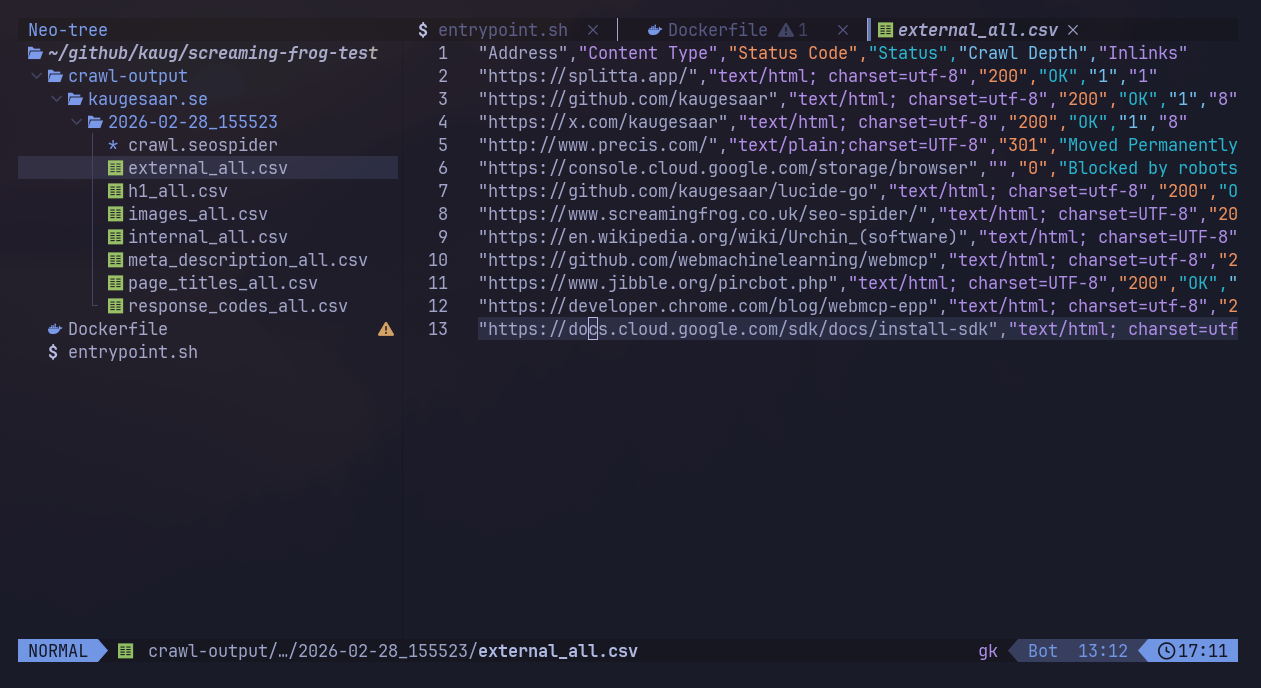
The output directory includes:
internal_all.csv - All internal URLs discoveredexternal_all.csv - External linksresponse_codes_all.csv - HTTP status codespage_titles_all.csv - Page titlesmeta_description_all.csv - Meta descriptionsh1_all.csv - H1 tagsimages_all.csv - Image inventorycrawl.seospider - Full crawl file (open in Screaming Frog GUI)
If all went well, you should now have something that looks close to this:
What’s next
This gives you a working setup for running Screaming Frog crawls serverless. From here, you could:
- Add configuration files: Use Screaming Frog’s config files to standardize crawl settings across executions
- Implement progress tracking: Parse log output to report crawl progress in real-time
- Build a web UI: Create a simple interface for managing crawls and viewing results (hint: this is what we built)
- Add notifications: Send alerts when crawls complete or fail
- Track changes: Compare crawls over time to detect new issues
Once deployed, crawls run unattended and you only pay for what you use.